

Acronis Backup for Windows Server Review and Features Comparison with Symantec Endpoint Protection
Acronis Backup and Recovery 12 Server is one of the best selling backup and recovery solution for server versions of Windows. It doesn’t have the ability for remote backup and recovery options like Backup and Recovery 12 Advanced for PC and Advanced Server 12 for Windows. It includes all main options and features of backup and restore software, they are:
– Backup and Restore. Save the whole image of the server or separate files/folders on any supported storage media (local drive, external drive, flash drives, CD/DVD/Blu-Ray discs, FTP servers, NAS, Acronis Online Backup). Restore the image in case of emergency quickly and easily.
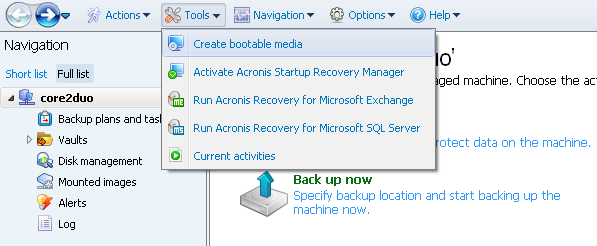
– Create Acronis bootable disc. In case your system is completely unbootable due to hard drive failure or virus attack you can use Acronis bootable disc to boot your system under Linux environment and restore the system from previously created image. As shown on the screenshot above you should go to Tools -> Create bootable media. Note: flash drive can also be used as bootable media.
– Backup plan. Easy navigation which allows you to choose what to backup, where to save it, create a schedule and use backup options.
– Create vaults. Vaults are just a backup storage which allows you to easily find all backups using Acronis Backup and Recovery 12 Server for Windows. It means that if you create plenty of images and different types of backups and save them inside Vault, the next time you run the program and click on vaults they all be visible and ordered.
– Disk Management. This is a light version of Acronis Disk Director, hard disk management tool. Allows you to create, delete and format volumes, clone disks, convert disks and change MBR to GPT and vice versa.
– Clone drive. Transfer the whole system to another bigger drive in several minutes. I would recommend you to use Acronis bootable disc for this purpose as it’s much safer.
Acronis Backup and Recovery 12 Server for Windows supports the following OS:
– Windows XP Professional SP2+ (x86, x64)
– Windows 2000 SP4 – all editions except for the Datacenter edition
– Windows Server 2003/2003 R2 – the Standard, Enterprise, Small Business Server editions (x86, x64)
– Windows Vista – all editions (x86, x64)
– Windows 7 – all editions (x86, x64)
– Windows Server 2008 – the Standard, Enterprise, Small Business Server editions (x86, x64)
– Windows Server 2008 R2 – the Standard, Enterprise, Datacenter, Foundation editions
– Windows MultiPoint Server 2010
– Windows Small Business Server 2011
Note: Remote connection to the agent is not possible.
Conclusion
Good technical support and ease of use make this backup and recovery software for servers really reliable. Software doesn’t require reboot after install so no need to power off servers. Must have for system administrators who don’t want to waste time reading long user guides.
Acronis Backup for Windows Server Essentials 12.5 Features Review
The new Acronis backup for windows server essentials 12 has been tagged as one of the best backup systems in recent years. First of all, the latest backup for windows server essentials 12 has the highest compression rate (at 27%), and there are 3 encryption options available. This backup system also comes with other key features such as:
– Folder-level backup,
– Virtual to physical (v2p) backup,
– Instant recovery feature,
– De-duplication features, and
– Migration features.
Many of the closest rivals of Acronis backup for windows essentials, do not possess most of the features listed above, thus, this backup provides more value for money.
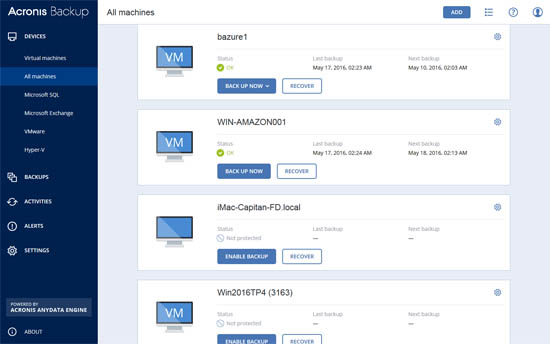
Comparing Acronis Backup for Windows Server Essentials 12 with version 11.7
There are quite a number of features that has been upgraded on the Acronis server essentials 12, and these features seem to be missing from the version 11.7. Below is a summary of differences between the two versions of acronis backup.
| Features | Acronis for Essentials 12 | Acronis for 11.7 version |
| Image Backup and Image restore | Available on all platforms, including; Windows and Linux. | Available for all platforms, including Windows, Linux, SQL,VMW, RHEV, Xen, and Orl. |
| The agentless or remote VM backup | Not available here | Available |
| Microsoft exchange backup | Not available on most platforms | Available as paid subscription |
| Microsoft SQL server backup | Not available on most platforms | Available on most platforms and it is available as a paid add-on, for Window server. |
| Microsoft active directory backup | Not available on most platform | Available for most platforms. |
| De-duplication | Not available | Available |
| Backup to cloud | Only available as paid option | Available as paid option |
| Remote installation | Not available in most platforms | Available |
| Microsoft SharePoint backup | Not available on most platforms | Available. |
Acronis Backup for Windows Server Essentials 12 vs. Symantec Endpoint Protection Small Business Edition
If you are searching for an all-inclusive single backup and recovery solution, most experts will recommend Acronis backup, especially newer models such as Backup for windows essentials 12. Any business running on VMware, Xenserver, Linus, SQL and Oracle platforms , can rely on Acronis for effective data backup and retrieval. Acronis is available in more than 90 countries with hundreds of thousands of customers.
Symantec is most known for its capability to develop the best anti-virus software in the tech industry, and has established its presence in over 50 countries around the world. The company claims to provide, fast easy and reliable backup , with varying plans for all categories of users. Regardless of which one you settle for, there are several differences to consider between Acronis for windows server essentials 12 and Symantec endpoint protection , small business Edition, these are summarized in the table below.
| Features | Acronis for windows server essentials 12 | Symantec endpoint protection for small business edition |
| Size | Suitable for organizations with thousands of employees | Ideal for organizations with fewer than 100 employees |
| Operating systems | Window, Mac and Linux | Windows and Mac only. |
| Management system | Cloud-managed services and on-premise management. This backup service can eliminate the cost of on-site management. It is very reliable with no downtime. | On-premise management only. It is reliable, with little downtime. |
| The Central management Console | Web-based central management system. The yearly subscription is cost-effective. | In-product management system. This service is cheaper than advance backup systems. |
| Advance protection within a virtual environment | Security feature is available | Not available. |
| Capacity | This is needed when multiple servers need to be protected, also needed when virtual hosts need maximum protection, and when advanced capabilities are desired. | Needed when a single or group of small servers need protection. It also comes with easy admin features or tools, and it is designed for those with small r limited IT knowledge. |
| Types of storage | Provides both cloud and on-site storage capabilities. Every backup and restoration can also be managed from one single location. | It must be managed onsite only , and there are no cloud storage options. New upgrades will be made available to allow customers upgrade to cloud-base storage soon. |
| Licensing | Comes with a perpetual licensing feature, alongside a flexible subscription plan. | License has to be renewed from time to time. |
| Advance capabilities | Comes with advance multiple capabilities for the most complex settings, including , the backup and migration of unlimited VMs. | Does not come with complex capabilities for backup and migration. |
| Support | Can support more than 10 different systems at once, these may include; Virtual systems, physical systems and application servers | Have limitations to few systems at once. |
| Other benefits | This is one of the fastest and easiest backup systems you can find in the world . Its backup and restoration is extremely fast. The backup is specifically modified and targeted towards specific systems | There can be some downtime as backup and restoration may not be as fast you want it. |